
티스토리 뷰
🎨 CSS(Cascading Style Sheets)
▶▶▶ sticky
✅ position: sticky
✅ fixed / sticky 차이
✅ 주의사항
1. position: sticky
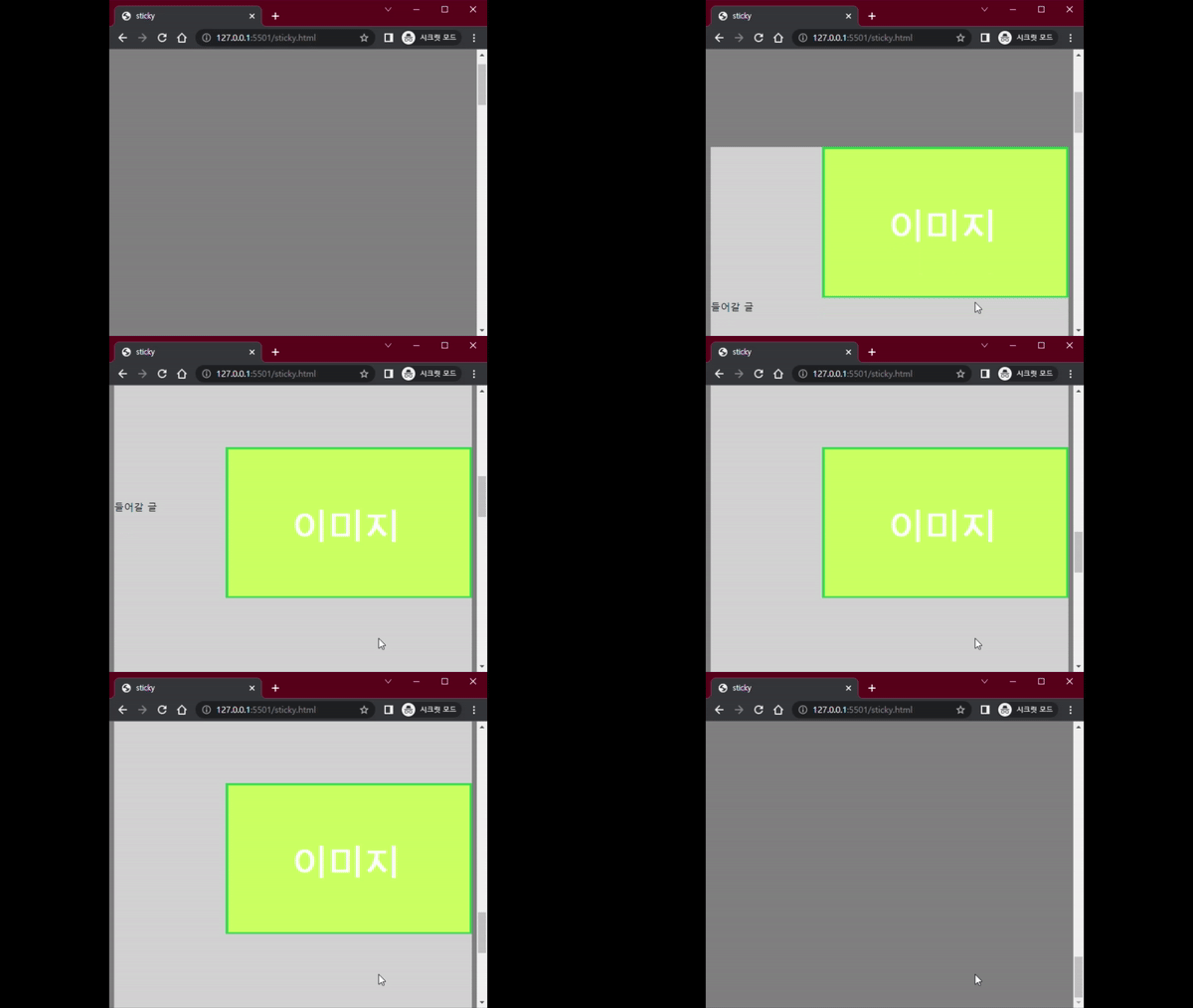
- 페이지가 스크롤 될 때 화면에 고정하는 요소
- Edge 이상에서 사용가능
<HTML>
<body style="background: grey; height: 3000px;">
  <div class="grey">
    <div class="image">
      <img src="img/이미지1.png" width="100%">
    </div>
    <div style="clear: both"></div>
    <div class="content">
      들어갈 글
    </div>
    <div style="clear: both"></div>
    <div class="content" style="margin-top: 300px">
      들어갈 글
    </div>
    <div style="clear: both"></div>
    <div class="content" style="margin-top: 300px">
      들어갈 글
    </div>
  </div>
</body>
<CSS>
.grey {
  background: lightgray;
  height: 2000px;
  margin-top: 500px;
}
.image {
  float: right;
  width: 400px;
  top: 100px;
  position: sticky;
}
.content {
  float: left;
  width: 400px;
}
<결과>
2. fixed / sticky 차이
- position: fixed - 항상 화면에 고정
- position: sticky - 스크롤이 되면서 이 요소가 화면에 나오면 고정
3. ❗ 주의사항
- 스크롤을 할 부모 박스가 필요
- 정확한 좌표가 있어야함(ex top, bottom, left, right..)
'Language > CSS' 카테고리의 다른 글
| CSS) display (0) | 2022.02.08 |
|---|---|
| CSS) 박스 모델(Box Model) (0) | 2022.01.25 |
| CSS) 속성값(property value) 단위 (0) | 2022.01.25 |
| CSS) 선택자(Selector) (0) | 2022.01.18 |
| CSS ) 시작 (0) | 2022.01.18 |
댓글